How do I make this layout?
So my current layout is:
<div style="width:900px;height:500px;border:6px double #00c7ff;"><table
cellspacing="1" cellpadding="0" border="0"
bgcolor="white" id="shell" height="500" width="900">
<tr height="50">
<td colspan="2" bgcolor="#cab0cb">
<table title="Banner" id="banner" border="0">
<tr><td>Place a banner here</td></tr>
</table>
</td>
</tr>
<tr height="50">
<td bgcolor="#cab0cb">
<table id="navigation" title="Navigation" border="0">
<tr><td><center><b><font face="arial" color="0094bd"><font
size="5">Records</font></b></center><br><br><font
size="2.5">No records set yet.</font></font></td></tr>
</table>
</td><td bgcolor="#cab0cb">
<table title="Content" id="content" border="0">
<tr><td><font face="arial" color="#0094bd"><b><font
size="5"><center>Welcome to Ivory Forest
Kennel</center></font></b><br><br><font size="2.5">We are a
fairly new kennel on K9, specialising in the great Siberian
Husky. Initially, we will be breeding and selling Huskies,
bred from simple gamebred dogs. Our huskies currently
specialise in Obedience, but we will seek further training
later. Soon, we will also be breeding Yorkshire Terriers, also
gamebred, so look forward to those!</font></font></td></tr>
</table>
</td>
</tr>
</table>
</div>
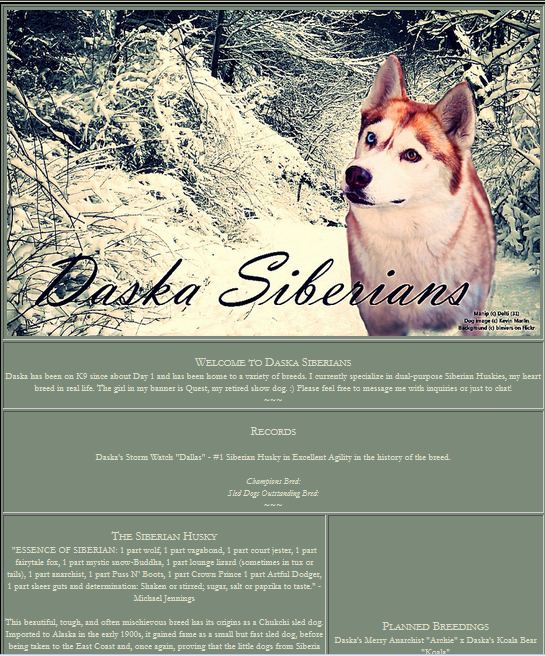
And Im trying to make it sort of like these:
http://i18.photobucket.com/albums/b135/silverfox13425/Decorated%20images/Dexterity_zps04ada334.png
http://i18.photobucket.com/albums/b135/silverfox13425/Decorated%20images/Siberians_zpsbe70e931.png
Which I could be going about it all wrong, to be honest, but it's working
thus far.. My issue at the moment is my "records" section is too thin. And
I cant figure out for the life of me how to make it wider. I have tried
editing everything that says "width", and making my own width=x sort of
command, but nothing seems to be working. No clue what I'm doing wrong
here.


No comments:
Post a Comment